|
| What's Xeesa Restart Shutdown? |
|
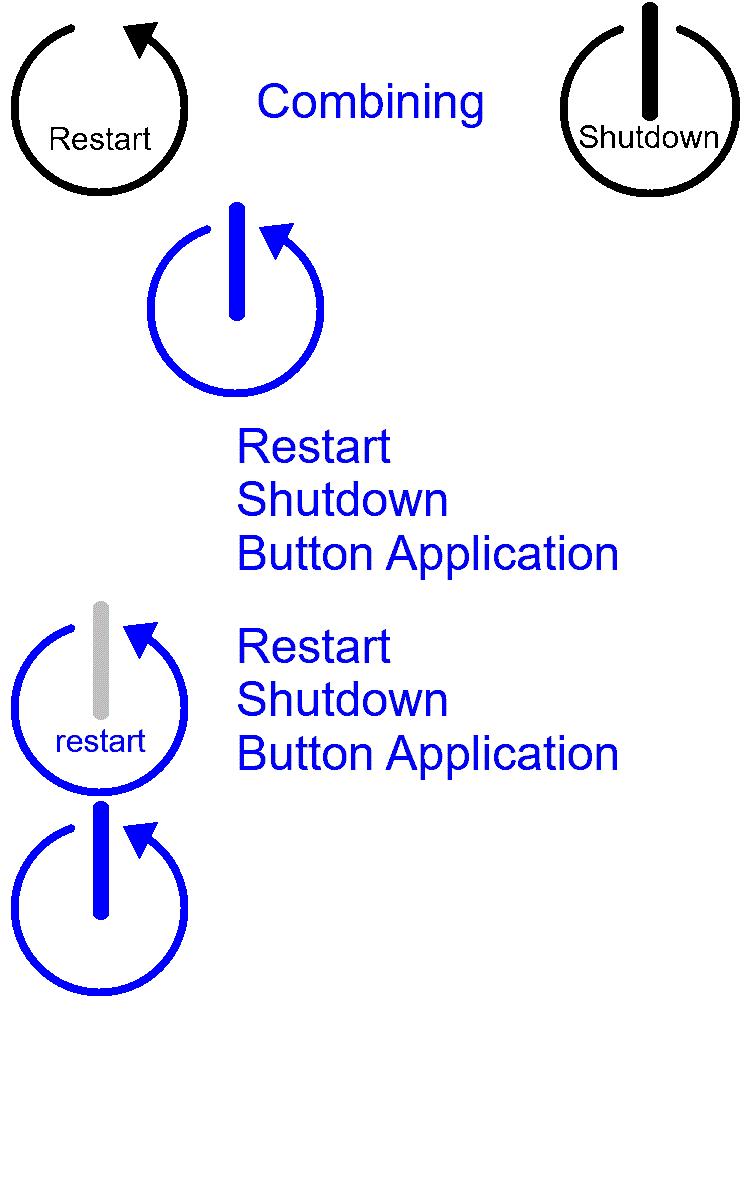
It is a restart shutdown software to companies/organisation to shutdown their computer with a restart first then shutdown later to improve the following.
Lower security risk as patch are completed fully/properly
Faster computing speed due to a restart occurs to clear cache/memory
Prevent BSOD as the computer is restarted and shutdown properly
Lesser IT incident tickets as most of them can be resolved by a restart |
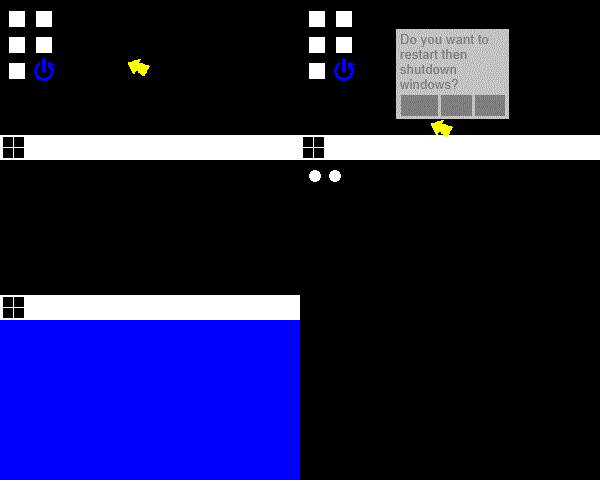
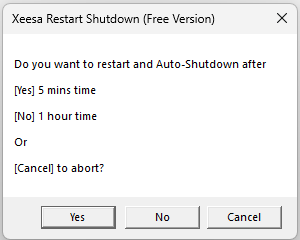
Example of how it restart and then shutdown after clicking.
|
|
| Current Issues in the infotech sector |
Incomplete Patching
Due to users who are rushing to off the computers. The patching process is not yet complete unless a restart is done. This may lead to BSOD due to sudden shutdown of computers.
Shutdown button (sleep or deep sleep) delaying patching
Since Windows 10 onwards, the shutdown seems becoming a sleep/hibernate button or deep sleep function as default. This may delay the patching to the next startup which delays the user start of the day which may irritates the users. Some user don't even restart their computers for weeks.
No restart then shutdown button in OS
User only know there is only a restart, shutdown or sleep button in the start menu. There is no such thing as restart then shutdown button.
Failing VPN connection/client
Due to the sophiscated linking of services by some VPN clients, the service or connection may not connect through. Restart is needed in order to work.
Security Risk
Patching is 1 of the KPI for most companies' infotech department. If the computer is not patched properly, there will be security risk. Hence, nobody wants this to happen.
BSOD
Blue screen of death happens if the patching is not done properly or completely. If the patching is done with the user working on it, will face hangs or slowness. User may force restart or shutdown which may lead to poor patching as the waiting time is too long for the user, so user force to shutdown and go home
|
|
| Why Xeesa Restart Shutdown? |
|
To let users trigger a proper shutdown with a restart in it to help the computer clear up memory/cache so that the computer will be properly patched and speed up. |
|
| Features |
Restart Shutdown Button (Right Bottom System Tray icon near the time & date or Desktop Icon)
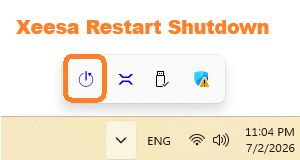
User Trigger Restart first then Shutdown
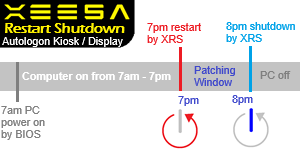
Scheduled Restart and shutdown automatically daily(For unmanned endpoints like kiosk/display TV).
|
|
| Post Results & Expectations |
Lesser Incomplete Patching
Due to users can choose to restart then shutdown the computer before knock off time. The computer will patch by itself once restarted and the computer will auto-shutdown after 1 hour or more. More complete patching.
No more delaying patching
Since there is restart and auto shutdown feature, the patching is unlikely to delay. This means patching is on time and user no longer will delay it due to it is an automated patching after they have clicked the Xeesa Restart Shutdown button.
Finally a restart then shutdown button in OS
User will use as there is a restart then shutdown button on the desktop or taskbar to restart to clear cache and shutdown after a certain time.
Lower Security Risk
Patching completes faster. The company will have lower security risk. Hence, the IT infrastructure is more protected.
VPN connected easily
Due to the VPN services are started properly after restart shutdown, VPN connections are easily established.
Lesser BSOD
As the patching is done properly or completely, lesser BSODs. Lesser users face hangs or slowness.
|
|
| Installation Requirements |
Endpoints with Windows 10/11 Operating System(32/64bit) to be installed on
Only need 3MB disk space.
|
|
| Installation Scenarios |
Scenarios faced and solutions recommended
| Scenario |
Issues Faced |
Recommendations |
Settings |
| Office Worker (9am to 6pm) |
Computer slow, always use the default shutdown button at 6pm to shutdown(sleep). Never restart for days. |
Use the restart shutdown button on the desktop or taskbar to trigger the restart shutdown instead of the conventional shutdown. |
shutdownaftersetting.xrs at after 5mins or other timing for pro version. |
| Office Worker (9am to 6pm) |
Computer didn't patched, always use the default shutdown button at 6pm to shutdown(sleep). |
Use the restart shutdown button on the desktop or taskbar to trigger the patch to take place after the restart. Then shutdown after 1hr instead of the conventional shutdown. |
shutdownaftersetting.xrs default at after 1hr or other timing for pro version. |
| Autologon Kiosk for Payment Counter (7am to 10pm) |
Computer didn't patched, as the default shutdown function at 10pm is to shutdown(sleep). |
Set the auto restart at 11pm and auto shutdown at 12mn. |
rsrestarthour.xrs set to 11pm, rsshutdownhour.xrs set to 12am. |
| Autologon Display for Train Arrivals (5am to 12mn) |
Computer didn't patched, as the default shutdown function at 12mn is to shutdown(sleep). |
Set the auto restart at 1am and auto shutdown at 2am. |
rsrestarthour.xrs set to 1am, rsshutdownhour.xrs set to 2am. |
| Autologon Display for Queue System (7am to 7pm) |
Computer didn't patched, as the default shutdown function at 7pm is to shutdown(sleep). |
Set the auto restart at 7pm and auto shutdown at 8pm. |
rsrestarthour.xrs set to 7pm, rsshutdownhour.xrs set to 8pm. |
|
|
| How to setup? |
Install the software on the computer
The software will automatically start in the background
The restart shutdown button can be found on the desktop or taskbar system tray icon near the WIFI/LAN or date and time display
Variables to Set if you are using Pro Version
| Settings |
Free Version |
Pro Version |
User Trigger
Restart Shutdown
Shutdownaftersetting.xrs |
5 mins for 5 mins delay to shutdown
1 hour for 1 hour delay to shutdown
|
5 mins for 5 mins delay to shutdown
Setting=30mins for 30 mins delay to shutdown
Setting=1hr for 1 hour delay to shutdown
Setting=2hr for 2 hours delay to shutdown
Setting=4hr for 4 hours delay to shutdown
|
Auto Restart
rsrestarthour.xrs |
7pm as default |
Setting=12am for 12mn restart
Setting=1am for 1am restart
Setting=2am for 2am restart
Setting=3am for 3am restart
Setting=4am for 4am restart
Setting=5am for 5am restart
Setting=6am for 6am restart
Setting=7am for 7am restart
Setting=8am for 8am restart
Setting=9am for 9am restart
Setting=10am for 10am restart
Setting=11am for 11am restart
Setting=12pm for 12pm restart
Setting=1pm for 1pm restart
Setting=2pm for 2pm restart
Setting=3pm for 3pm restart
Setting=4pm for 4pm restart
Setting=5pm for 5pm restart
Setting=6pm for 6pm restart
Setting=7pm for 7pm restart
Setting=8pm for 8pm restart
Setting=9pm for 9pm restart
Setting=10pm for 10pm restart
Setting=11pm for 11pm restart
|
Auto Shutdown
rsshutdownhour.xrs |
8pm as default |
Setting=12am for 12mn shutdown
Setting=1am for 1am shutdown
Setting=2am for 2am shutdown
Setting=3am for 3am shutdown
Setting=4am for 4am shutdown
Setting=5am for 5am shutdown
Setting=6am for 6am shutdown
Setting=7am for 7am shutdown
Setting=8am for 8am shutdown
Setting=9am for 9am shutdown
Setting=10am for 10am shutdown
Setting=11am for 11am shutdown
Setting=12pm for 12pm shutdown
Setting=1pm for 1pm shutdown
Setting=2pm for 2pm shutdown
Setting=3pm for 3pm shutdown
Setting=4pm for 4pm shutdown
Setting=5pm for 5pm shutdown
Setting=6pm for 6pm shutdown
Setting=7pm for 7pm shutdown
Setting=8pm for 8pm shutdown
Setting=9pm for 9pm shutdown
Setting=10pm for 10pm shutdown
Setting=11pm for 11pm shutdown
|
|
|
| Software Download |
Xeesa Restart Shutdown V26.2.002 (32bit Summer Version) - Download Free Version Now(.zip file)
For Windows 10/11 OS (Build 23H2 - 25H2)
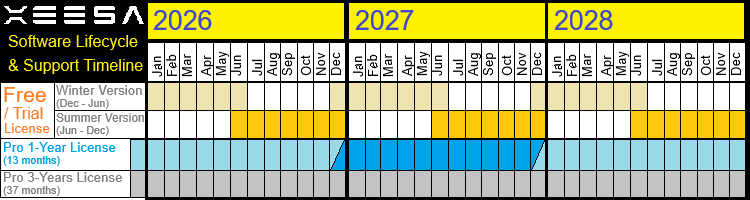
Xeesa Restart Shutdown Software Lifecycle
|
|
| Software Version Updates |
2026-7-10 Version 26.2.002Release of Xeesa Restart Shutdown V26.2.002 with 5mins option delay shutdown
Windows 11 23H2, 24H2, 25H2 tested
2026-7-7 Version 26.2.001Release of Xeesa Restart Shutdown V26.2.001
|
|
| Pro VS Free Version |
| Features |
Free Version |
Pro Version |
Pro Version 3 Years |
| Restart Shutdown Button |
Yes |
Yes |
Yes |
| Later Shutdown Delay Options |
5mins,1hr option |
5mins,30mins,1hr,2hr,4hr |
5mins,30mins,1hr,2hr,4hr |
| Schedule Restart Shutdown |
Yes |
Yes |
Yes |
| Scheduled Restart Hour |
Only at 7pm |
Any hour from 00:00hr to 23:00hr
|
Any hour from 00:00hr to 23:00hr
|
| Scheduled Shutdown Hour |
Only at 8pm |
Any hour from 00:00hr to 23:00hr
|
Any hour from 00:00hr to 23:00hr
|
| Customized Settings for .xrs files in installers |
No |
Yes. Up to 3 Installer Packages
(eg;user/kiosk/display) |
Yes. Up to 3 Installer Packages
(eg;user/kiosk/display) |
| License Usage Lifespan |
6 months |
1 year |
3 years |
| Suitable for |
Small Biz/Org lesser than 100 endpoints |
Companies/Org with 100 endpoints or more |
Companies/Org with 100 endpoints or more |
| License Price |
Free |
Yearly Renewal
Block of/upto 100 endpoints at USD$199.00
Block of/upto 1,000 endpoints at USD$1599.00
Block of/upto 10,000 endpoints at USD$11,999.00
|
3-Years Renewal
Block of/upto 100 endpoints at USD$399.00
Block of/upto 1,000 endpoints at USD$3199.00
Block of/upto 10,000 endpoints at USD$23,999.00
|
|
|
| Frequenty Ask Questions (FAQ) |
1. How does it works?
It is a small background windows app to let user to do a restart then shutdown after 30mins/1hr/2hr/4hr later. So users can go home first and let the computer do the patching itself and shutdown after 30mins/1hr/2hr/4hr later. .
2. Does it takes a lot of space or memory?
The program only need less than 2MB memory, less than 5% CPU usage.
3. Is it a local software or cloud software?
Local software which runs on your computer. No need internet or intranet.It can run standalone
4. Do I need to upgrade or reinstall to a newer version for restart shutdown?
For Free version, it will be every 6 months. For Pro Version, it will be yearly or every 3 years to update to a later version, so you won't need to keep updating the software.
5. Does the program able to install on other OS like android/IOS/Ubuntu?
No. It can only support Windows 10/11 Operation Systems currently which is from version 21H2 to 25H2.
6. Any restriction limit for Free Version?
Free Version is for small companies with lesser than 100 pax staff and need to update the version every 6 months due to the free license only last 6 months. For the schedule restart shutdown timing, only it restart at 7pm and shutdown at 8pm. For user trigger restart shutdown, the later shutdown timing will be after 1hr. Cannot change for Free Version. Only Pro Version can change.
7. How does it help my organization from this software for the endpoint restart shutdown?
It can cut down on patching failed computers in the premises as sometimes patching bluescreen your computer due to not properly patch as some patches take longer time. It saves time for the user as the computer will auto shutdown later so the user no need to wait for the computer to patch finish. Remember this hard in your mind. Staff/Users from non-IT department are not obligated to do IT staff job like waiting for the patch to be done before shutting down the computer. The staff/user have their own major job duties to fulfil, not to help the IT department to wait for the computer to be patched.
8. What is the ROI on this software to my organization for the Restart Shutdown function?
The return is high due to staff no need to wait at average 30 mins per computer. It cost 12 months x 30 mins of waiting for the computer to shutdown. If an average of labour in the organization cost $20 per hour. You will save $240 per computer per year. If your organization needs to wait around 5,000 computers a year by asking user to wait for patching then shutdown, you will save $1,200,000 a year by removing the step to wait for the computers.
9. What is the ROI on this software to my organization for the Schedule Restart Shutdown function?
The return is high too due to the computers breakdown if patching is for done completely. It saves incident ticket cost. It also reduce patching problem. It will lead to less turnover on IT Staff as the computers are welly patched completely.
10. Can I download and test the software first before I buy the license for my large organisation like 10,000 computers?
Yes Please. You may deploy/install the free version to your users' computers to test and see whether it helps them to prevent BSOD or breakdowns. Try it and see whether it works for your company. If it is improving in the IT environment, you can buy later for 1yr or 3yr Pro license for better support.
|
|
| Purchase License and Pricing for Pro Version |
Yearly Renewal
Block of/Upto 100 endpoints at USD$199.00 per year (USD$1.99 per endpoint per year)
Block of/Upto 1,000 endpoints at USD$1599.00 per year (USD$1.60 per endpoint per year)
Block of/Upto 10,000 endpoints at USD$11,999.00 per year (USD$1.20 per endpoint per year)
3-Years Renewal
Block of/Upto 100 endpoints at USD$399.00 for 3 years (USD$1.33 per endpoint per year)
Block of/Upto 1,000 endpoints at USD$3199.00 for 3 years (USD$1.07 per endpoint per year)
Block of/Upto 10,000 endpoints at USD$23,999.00 for 3 years (USD$0.80 per endpoint per year)
Payment over at secure website(Stripe Payments)
Once payment done, whatsapp/email us. We will verify at our side and send you the link via email to download the pro-licensed installer from our website(xeesa.com)
For example of a company with 2700 endpoints for a year license, the company need to purchase 2 quantity of 1000 endpoints and 7 quantity of 100 endpoints license.Total price is USD$4,591.
If your company is expanding to around 3000+ endpoints for the year or next 3 yrs, the company can purchase 3 quantity of 1000 endpoints instead. Total price is USD$4,797
|
|
| Contact Us |
By Whatsapp/Email

By Website Form
|
Other Solutions by Xeesa Services
|
 Restart Shutdown

